What the application controls
- plan selection for the detected storage type,
- operation order and error handling,
- local execution of critical actions,
- journal, report and interruption recovery.

Secure file deletion software for Windows
Capture files without leaving File Explorer. The software selects a storage-aware plan, performs a controlled deletion process and presents the result in a clear report.
01 / The difference
Delete, Shift+Delete or emptying the Recycle Bin removes a file from normal system view. Data fragments may still remain on the storage device and be available to recovery tools until they are overwritten or handled by storage-specific mechanisms.
MindVaultEraser treats deletion as a process: it identifies the storage type, prepares a plan, performs the operation and records the outcome. It does not replace hardware sanitisation of an entire drive, but it provides substantially more control over deleting selected files than the Recycle Bin.
MindVaultEraser™ / Features in practice
EraseIQ™, Chain of Custody™, Ctrl + mouse capture, the special folder, automation and email control — explained through everyday situations.
Explore the features and gesture demonstration ↗02 / Workflow
The key capabilities form a shared chain instead of operating as a loose collection of tools.
Ctrl and drag in File Explorer sends selected items to a controlled special folder. Files can also be added directly from the application.
The engine identifies the storage type and selects how to proceed. HDDs, SSDs, NVMe drives and flash storage are not treated as the same device.
Critical file operations use Rust components for renaming, overwriting, deletion and write synchronisation. File contents are not uploaded to a server.
EraseIQ™ Chain of Custody records the workflow and result. If an interruption occurs, the application detects remnants and offers a controlled way to finish the operation.
03 / Interface
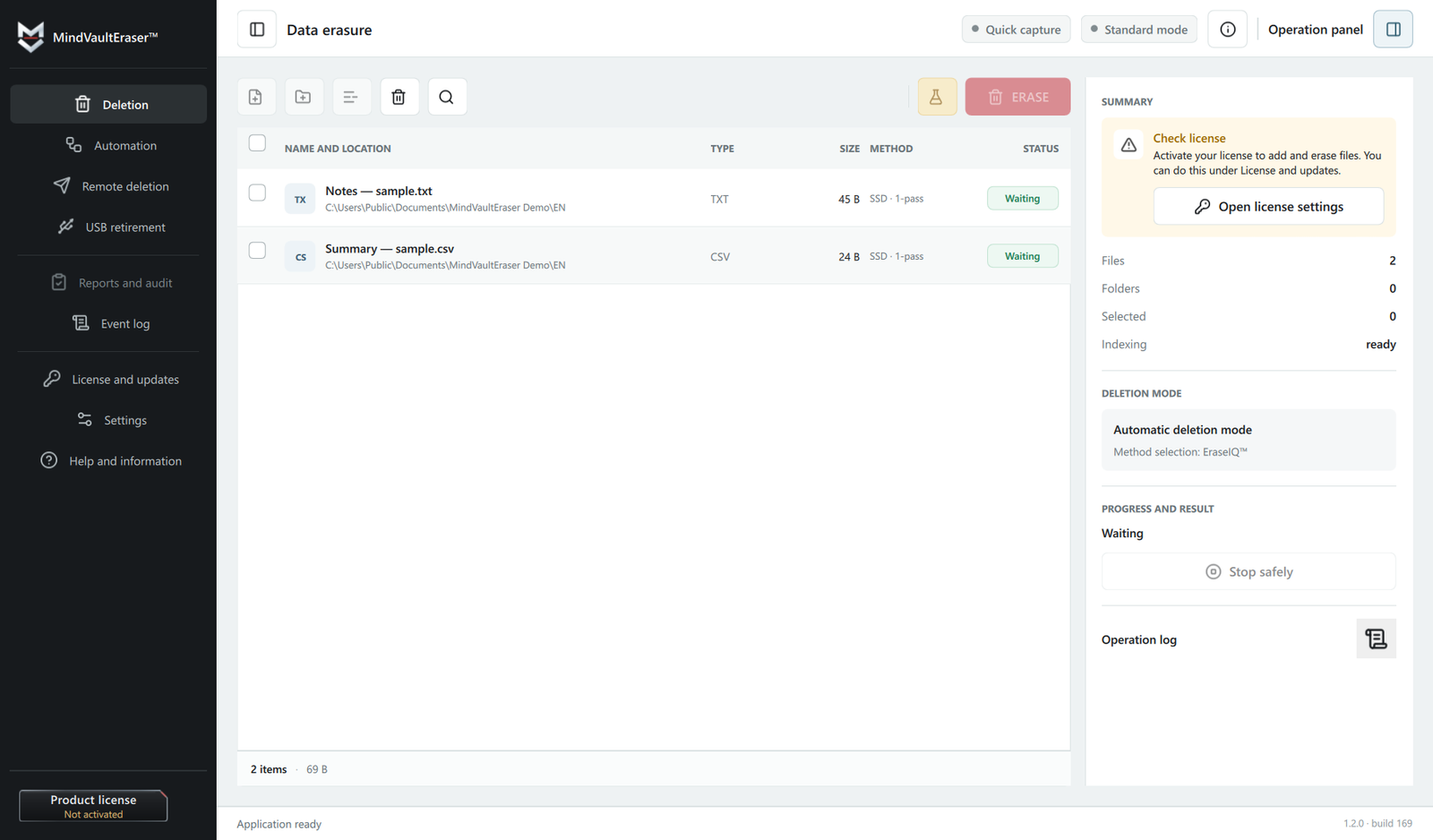
The list shows the source, storage type, status and deletion plan. The primary operation remains clear, while technical details are available when needed.
04 / Control
The report therefore distinguishes the completion of an operation from an unconditional guarantee about the physical state of every memory cell. That is more honest and technically accurate than claiming “100% on every drive”.
05 / Readiness
Material intended for deletion is collected in one controlled location. Automation can process it according to rules, while an authorised remote command can start deletion of the folder contents when the user does not have direct access to the computer.
06 / Answers
Not always. Windows removes the visible entry and makes the occupied space available, but the underlying data may remain until it is overwritten or handled by storage-specific mechanisms. Read the complete explanation.
You need a process appropriate for the storage device, not simply a way to bypass the Recycle Bin. MindVaultEraser prepares a plan, performs the operation locally and records the result.
No. Direct sector overwriting behaves differently on magnetic disks and flash storage. SSDs and NVMe devices use controllers, TRIM and wear levelling, which require a different approach and a more careful assessment of the result.
No. File contents remain on the device and deletion is performed locally. The server may handle licensing, updates and voluntary diagnostic reports, but it does not receive the contents of deleted files.
No. The goal is to make data recovery difficult or impossible. Before starting, the application displays the target list and requires deliberate confirmation.

Free trial / 14 days, no card required
Learn how HDDs and SSDs differ, how the features work and when MindVaultEraser™ may be an alternative to other tools.